Entry Limit Orders: Buy Entry Limit and Sell Entry Limit - Limit Order in Forex
Limit order definition: An entry limit means ordering a Forex currency to be bought or sold at a specific price, at a pullback point where the price should go back to before continuing its first direction. Traders use these to buy or sell at a more favorable market price. Most online trading platforms have these trade orders: we'll use MetaTrader 4 as our example.
An entry of this type can be used to open buy position below the market level (up trend market retracement) or sell above market level (downtrend market retracement).
A buy limit order triggers when the market price retraces downward to a predefined level, allowing you to enter your position at the desired price.
Sell Limit - For a sell order, your entry limit is triggered and opened when the exchange rate climbs to the predetermined price level you specified (a rebound upwards).
Entry orders are placed by traders anticipating a price rebound after reaching this point.
- Entry Buy Limitbuy at a point below the ruling market level.
- Entry Sell Limitsell at a price point above the current market level.
Buy Entry Limit Example
In the pic below, a buy limit order waits to grab a buy under the current price. Point B marks where it sits.
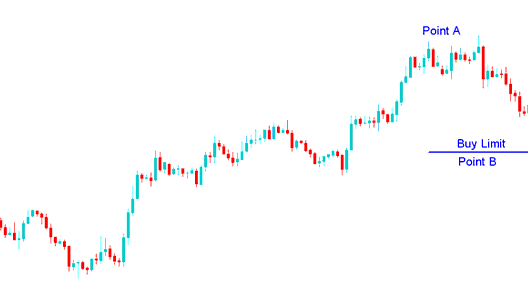
A limit buy order is an instruction placed to open a purchase position below the current observable market price.
The currency pulled back and hit the buy limit entry. Then price kept climbing in the main uptrend. Once hit, the limit order turned into a buy.
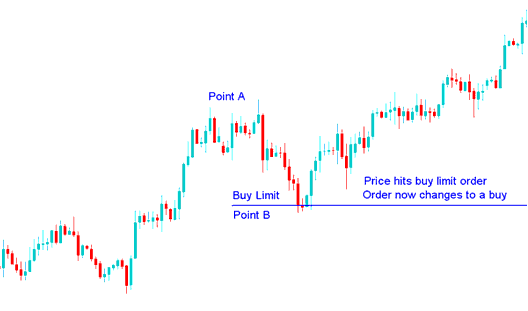
Price reaches the buy limit, so the order turns into a buy.
Sell Entry Limit Order
In the example below, a sell limit order sets an entry above the current price. It targets a price pullback level.
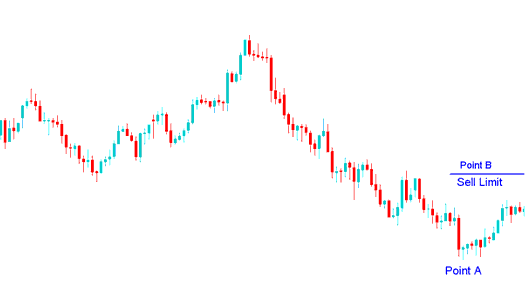
Entry limit sell order placed to open sell above current price
The value then rose, reaching the sell entry limit, & afterwards the price kept falling as was first expected from the initial downward trend.
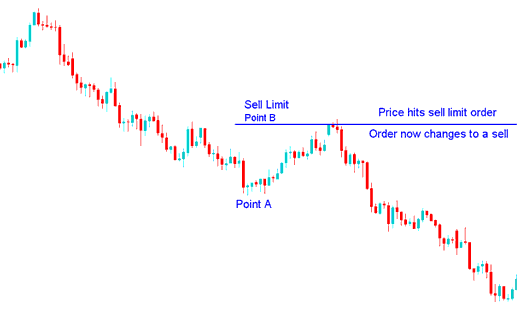
Upon the price reaching the established sell limit, the pending order immediately converts to an active sell position.
When forex quote hit the set level the order changed to a sell, this is therefore a nice method to buy or sell at a better price after a pull back.
Setting Buy & Sell Limit Orders in MT4 Platform
To set up these orders in MetaTrader 4 platform, Right-Click on chart>>> Choose "Trading">>> Then Choose/Select the "New">>> Then on the pop up window that shows up (shown below), under label "Type" choose the option/choice of the "pending" instead of "market execution">>> Under pending order options choose the pending order type: for This trade select either "Buy Limit" or "Sell Limit" depending on whether you as the trader want to place a pending sell or buy.
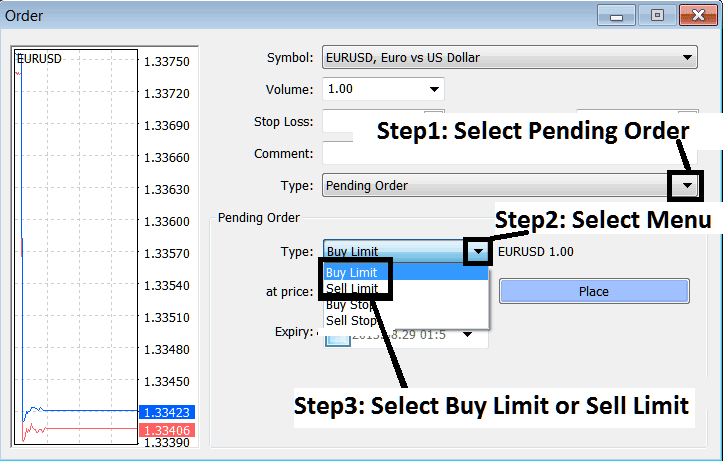
Setting Buy & Sell Limit Orders on the MT4
Picking the right point for a trade entry can be hard. Set it too far, and the order might not fill. Use the Fibonacci retracement tool. Aim for the 38.2% level. Many traders watch this spot. Orders pile up there. So your chances improve to enter a trade at that level.
Fibonacci Retracement Education - A Comprehensive Tutorial
Tip: When trading online, if you want to set a good level to automatically take your profit (not a level where the price goes back a bit, but the level where you take your profit) for your trades, you can use the Fib extension 100% level for the best place to take your profit. If you want to learn more about FX Fibo Retracement and Fib expansion, use the Technical Analysis section in the menu on the right.
Fibonacci Expansion Tool Tutorial - Fibonacci Expansion Tool Tutorial
Study Additional Tutorials, Lessons, and Subjects:
- Displaying Trade Instruments in MetaTrader 4 Trade Platform
- DJ 30 Strategies List & Best DJ 30 Strategies for DJ 30
- How is US500 Index Traded in the MetaTrader 4 and MT5 Platform?
- How Can I Trade MT5 FX Trend Lines Trading Indicator & MetaTrader 5 Channels Indicator on MT5 Platform?
- How to Set Rate of Change Trading Indicator on MetaTrader 4 Charts
- Forex Leverage & Margin Forex Explanation & Examples
- Rainbow Charts Forex Buy Sell Trade Signal
- Forex Register Account
- Bollinger Band and Forex Price Volatility, High Volatility Markets and Low Volatility Markets
- Pips Value For SPAIN35 Indices